

Code was added that will update unpaid invoices when a client, administrator or staff user makes a payment. The check is done automatically for clients. For administrators and staff users there will be an option to select if you want to update unpaid invoices.
When a payment is made and there are unpaid invoices on record, the unpaid invoice(s) will be marked as paid if the payment is sufficient to pay the invoice(s) in full. In the case where there are multiple unpaid invoices, all invoices will be marked as paid if the payment covers the cost of the invoice. The software will cycle through each unpaid invoice in ascending order from oldest to newest.

The following depicts occasions when this check runs:
- client makes a payment and invoices are checked, when logged in to the software
- client makes a payment and invoices are checked, when booking from the online booking tool with prepayment mode active
- admin or staff user makes a payment from pay assist, if "Update Unpaid Invoices" is selected, unpaid invoices will be checked. You can save your selected or unselected preference from the Pay Assist Settings page
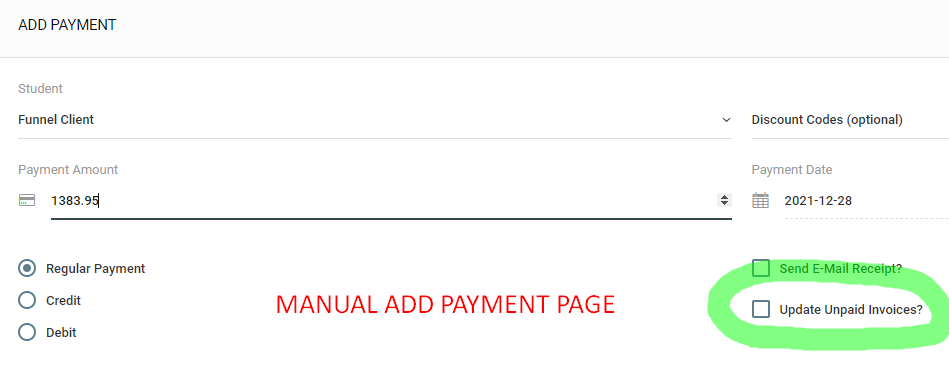
- admin or staff user makes a manual payment from the Add Payment page, if "Update Unpaid Invoices" is selected, unpaid invoices will be checked
This feature was added to the software to reduce the steps required when a payment is made against an unpaid invoice. Instead of tracking the payment and then changing the status of the invoice, both actions can be completed with the add payment operation.
This feature does not impact the automated invoicing process and it does not override the manual invoice creation process when used with Stripe. If you create a manual invoice and place an amount in the Stripe field, if the payment is successful, the invoice will be updated accordingly regardless of the Update Unpaid Invoice selection.
More specifically, when a client has an outstanding invoice and logs into the software they are met by a PAY NOW invoice button and a Make A Payment form. Many clients go to the payment form instead of clicking on the green PAY NOW button. When they do this their payment is recorded but the invoice was not updated. This leads some clients to surmise an error and attempt a duplicate payment. Obviously this behavior is not optimal. Hopefully this feature will prevent that type of behavior and improve user experience.
If you have any questions, please contact support at mail@bizstim.com.
Sincerely,
The Bizstim Team
