

FIND INACTIVE CLIENTS FAST!
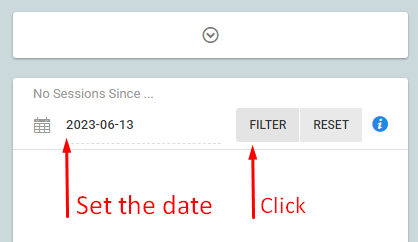
You can locate inactive clients using our new client inactive tool. To use this exciting new feature go to the active clients list. Above the list of clients there is a date picker, a filter button and a reset button.
Choose your inactive date. By default we will display a date that is 3 months in the past. Click the FILTER button.
The system will check for those clients who have not had a session on the calendar since the date selected. The resulting list is your inactive clients that you can quickly mark inactive using our bulk edit tool.
OTHER UPDATES
The following updates are also available:
- clients and their agents must use strong customer authentication when saving credit cards to their accounts
- added an offline process to make sure the waiting list is up-to-date and accurate
- added an offline process to send a daily waiting list report to the administrator or staff users
If you have any questions, please contact support at mail@bizstim.com.
Sincerely,
The Bizstim Team
