

Google Chrome updated their browser recently and introduced errors. If you are experiencing issues with Chrome in window mode or your bookmarks bar is not displaying properly etc then we recommend you do a manual update. In our testing updating Chrome manually fixes the odd behavior. This issue is entirely Google Chrome and is NOT related to the performance of our software.
To manually update Google Chrome do the following:
- Click on the 3 horizontal dots at the top-right of your browser
- Select HELP from the menu (2nd-last option)
- Select About Google Chrome
- Click the button to Update Chrome (if one is available)
- When complete, click the Reload button
- The latest version as of the writing of this update is: 104.0.5112.81
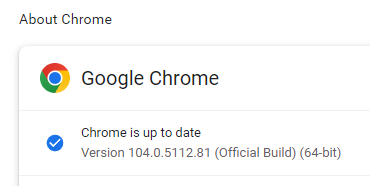
After applying this update we did not experience any issues with the browser. If you need help, as always, contact Bizstim support and we will assist you.
If you have any questions, please contact support at mail@bizstim.com.
Sincerely,
The Bizstim Team
